Gridely
Cross stitch

Turn any photo into a cross stitch pattern

Upload a picture, choose how many stitches wide it should be and how many colours to use, then fix every stitch by hand before you print. Your chart, your fabric, your floss.

  • Start without an account
  • Free charts up to 500ร—500
  • Works on phone, tablet and desktop
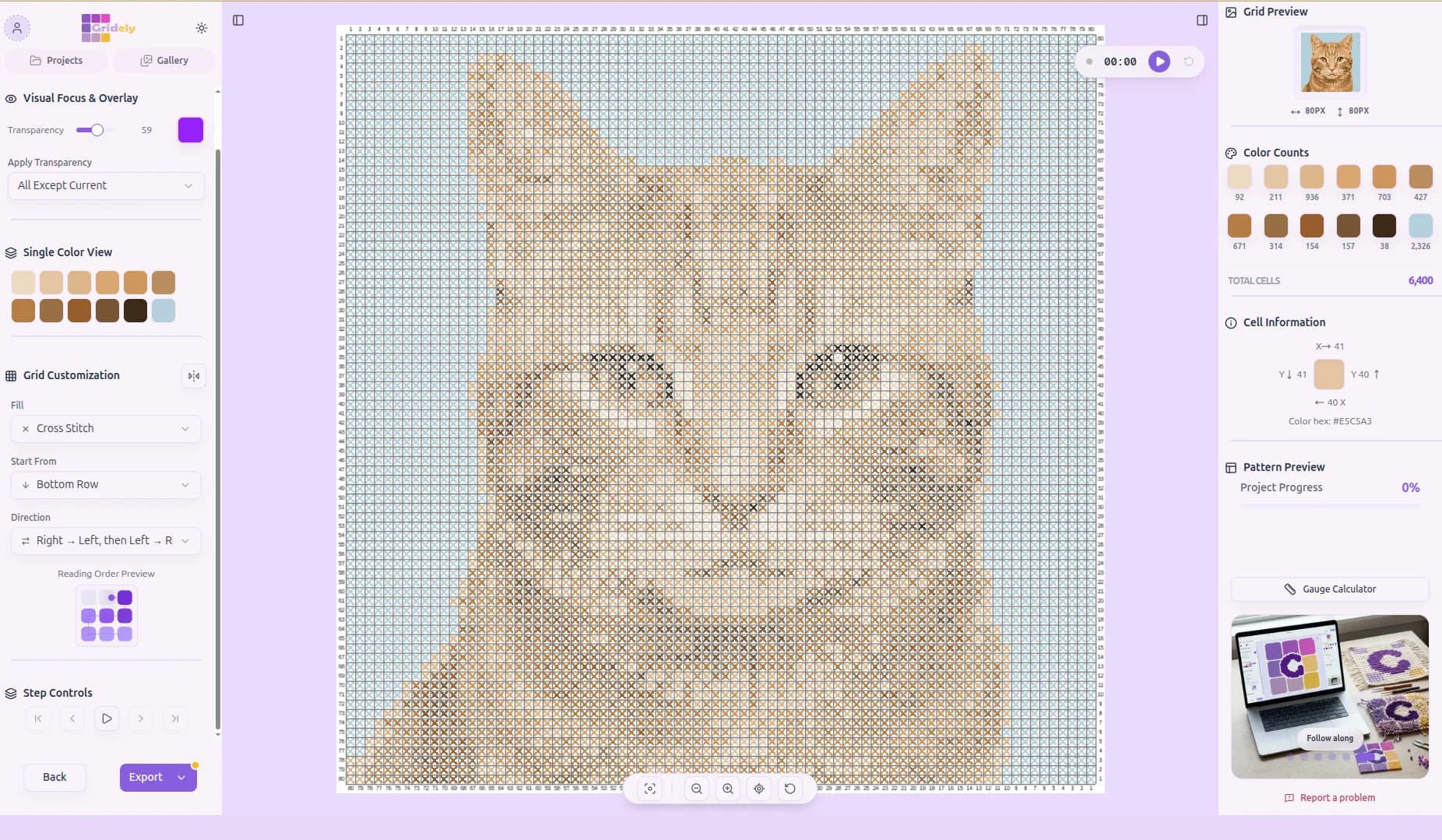
A photo of a ginger cat converted into a cross stitch chart in the Gridely editor

From photo to chart in three steps

No software to install. It all happens in the browser tab you are reading this in.

  1. Step 1

    Upload your photo

    PNG or JPEG, any size. Crop it, flip it, adjust brightness and contrast so the subject stands out from the background.

  2. Step 2

    Set size and colours

    Choose the width in stitches โ€” the height follows the photo's proportions โ€” and how many floss colours the pattern may use. Fewer colours means fewer thread changes.

  3. Step 3

    Edit, then export

    Clean up stray single stitches with the pen and bucket fill, then export a PDF chart with symbols, grid numbers and a colour legend.

Made for stitching, not just for pixels

A converter gets you a first draft. These are the parts that turn it into a pattern you can actually follow.

Photo conversion you control

Colour count, width and filters are set by you, and you see the chart change as you adjust them โ€” no black-box result to accept or reject.

A palette you can edit

Merge two near-identical greens, swap a colour for one you already own, or add a highlight the photo lost.

Symbols, crosses or colour blocks

Show cells as filled squares, as cross stitches, or with a symbol in each one โ€” the classic format for printing in black and white.

Printable PDF chart

Row and column numbers, a colour legend matched to the nearest DMC floss, and a written row-by-row version if you prefer counting to reading a grid.

A reader that keeps your place

Stitch straight from a phone or tablet: the grid reader highlights the current row, counts each colour run, and remembers where you stopped.

Digitise a paper chart

Photograph a chart from a book or magazine and Gridely detects the grid, so you can edit it, recolour it or read it on screen.

Getting a good cross stitch pattern from a photo

The converter does the counting. These choices are still yours, and they matter more than any setting.

Choose a photo that will survive being simplified

A cross stitch chart is a photo reduced to a few dozen colours and a few thousand squares, so the best source images are the ones that still read at that level: one clear subject, strong contrast between it and the background, and even lighting. A pet against a plain wall converts beautifully; a group photo at dusk does not.

Crop tightly before you convert. Every stitch spent on background is a stitch not spent on the face you care about.

Pick the size in stitches, not in centimetres

The chart has no physical size until you choose a fabric. The same 100-stitch-wide design is about 23 cm across on 11-count Aida and 14 cm on 18-count โ€” the table below shows the common counts. Decide how big you want the finished piece, pick your fabric, and work backwards to the stitch count.

More stitches give more detail but take longer: a 150 ร— 150 chart is 22,500 stitches. For a first project from a photo, 60 to 100 stitches wide is a comfortable range.

Fewer colours usually looks better

Photos contain thousands of tones, and asking for too many floss colours produces 'confetti' โ€” isolated single stitches of a colour that appears nowhere nearby. They are tedious to stitch and invisible from a metre away. Start with 12 to 20 colours, then merge any two that are hard to tell apart on screen.

After converting, zoom in on the face or main subject and hand-edit it. Eyes, in particular, are worth fixing stitch by stitch: a single misplaced highlight changes the expression.

Choosing floss

The PDF legend names the nearest DMC thread for every colour in your palette, so you can take it to a shop as a shopping list. Screens and floss never match perfectly โ€” hold the actual skeins together before you commit, especially for skin tones.

Finished size of a chart 100 stitches wide, stitched over one square of Aida.
FabricStitches per inchFinished width
11-count Aida1123.1 cm (9.1 in)
14-count Aida1418.1 cm (7.1 in)
16-count Aida1615.9 cm (6.3 in)
18-count Aida1814.1 cm (5.6 in)
28-count evenweave, over two1418.1 cm (7.1 in)

Cross stitch pattern maker โ€” questions

Is the photo to cross stitch converter free?

Yes. Converting a photo, editing the chart and reading it on screen are free, on charts up to 500ร—500 stitches. Exporting needs a free account and includes a watermark; clean exports come with the Studio plan or a one-off unlock for a single pattern.

Does the pattern include DMC thread numbers?

The PDF legend matches each colour in your palette to the nearest DMC embroidery floss, so you know which skeins to buy.

Can I print the chart in black and white?

Yes โ€” switch the chart to symbols and every colour gets its own symbol, which reads clearly on a black-and-white printer.

How many colours should I use?

For most photos, 12 to 20. More colours than that rarely look better once stitched and add many isolated stitches. Free charts can use up to 20 colours, paid plans up to 50.

Can I use it on my phone?

The editor and the grid reader both work on phones and tablets. For detailed stitch-by-stitch editing a larger screen is more comfortable, but reading a chart while you stitch works well on a phone.

What about the rights to the photo?

Use photos you took yourself or have permission to use. Patterns you make from your own photos are yours.

Ready to Make Your First Pattern?

Start designing patterns, charts, and pixel-based creations with Gridely. Designing is free, it's easy to get started, and it's growing with its community.

    Photo to Cross Stitch Pattern Converter โ€” Free Online